
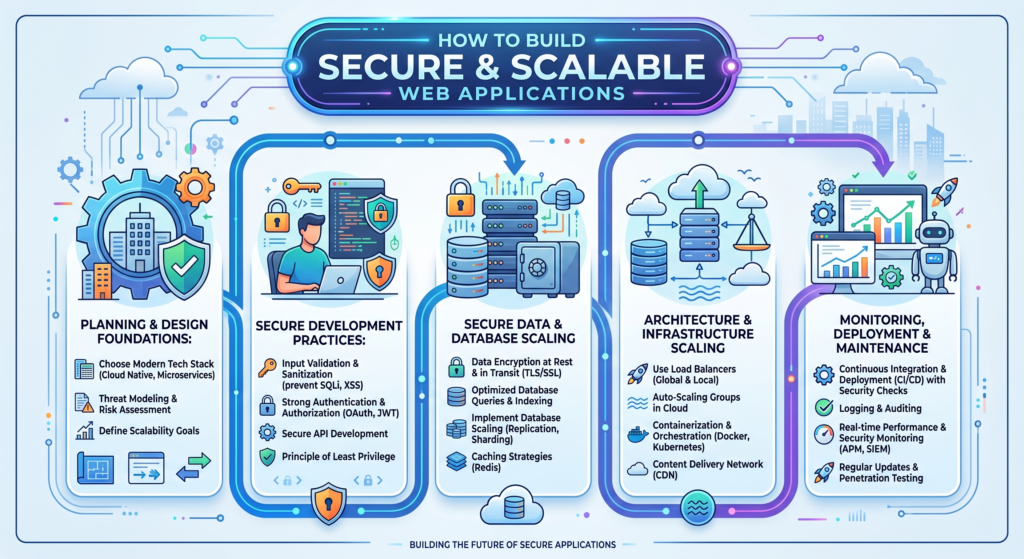
Building a web application today is not just about making it work—it is about making it secure, scalable, fast, and future-ready. Whether you are a startup or an established business, your application must handle growing users, protect sensitive data, and deliver a smooth experience under all conditions.
Thank you for reading this post, don't forget to subscribe!In this guide, we will break down how to build secure and scalable web applications step by step, using modern development practices, architecture patterns, and security principles.
- Understanding What “Secure and Scalable” Really Means
Before diving into technical details, it’s important to clearly understand the two core concepts:
🔐 Security in Web Applications
Security means protecting your application and users from:
- Data breaches
- Unauthorized access
- Malware and attacks (like SQL injection, XSS)
- API abuse
- Identity theft
A secure application ensures:
- Data privacy
- Authentication & authorization
- Safe communication
- Compliance with standards (like GDPR)
📈 Scalability in Web Applications
Scalability means your application can handle:
- Increasing users
- More data
- Higher traffic loads
- New features without breaking
A scalable system grows smoothly without:
- Crashing under load
- Slowing down
- Requiring complete redesign
- Choosing the Right Technology Stack
Your technology stack is the foundation of your application.
🖥️ Frontend (User Interface)
Popular choices:
- React.js
- Vue.js
- Angular
Key goals:
- Fast rendering
- Responsive design
- Smooth user experience
⚙️ Backend (Server Side)
Popular options:
- Node.js
- Python (Django / Flask)
- PHP (Laravel)
- Java (Spring Boot)
Key goals:
- Secure data handling
- API management
- Business logic processing
🗄️ Database
- PostgreSQL (highly secure and scalable)
- MySQL (widely used)
- MongoDB (flexible NoSQL option)
☁️ Hosting & Cloud
- AWS (Amazon Web Services)
- Microsoft Azure
- Google Cloud Platform
Cloud hosting is essential for scalability because it supports:
- Auto-scaling
- Load balancing
- High availability
- Secure Application Architecture
A strong architecture is the backbone of a secure system.
🧱 Use Layered Architecture
Divide your system into layers:
- Presentation Layer (Frontend)
- Business Logic Layer (Backend)
- Data Layer (Database)
This separation improves:
- Security
- Maintainability
- Scalability
🔌 Use API-Based Communication
Modern applications use REST or GraphQL APIs.
Benefits:
- Better security control
- Easier integration
- Independent frontend/backend scaling
🔐 Microservices Architecture (for large apps)
Instead of one big system, break it into services:
- User service
- Payment service
- Notification service
Advantages:
- Easy scaling
- Fault isolation
- Faster development
- Implement Strong Security Practices
Security should be built in from the start—not added later.
🔑 Authentication & Authorization
Use secure login systems:
- JWT (JSON Web Tokens)
- OAuth 2.0
- Multi-Factor Authentication (MFA)
Best practice:
- Never store passwords in plain text
- Always use hashing (bcrypt, Argon2)
🛡️ Protect Against Common Attacks
- SQL Injection
- Use parameterized queries
- Avoid direct SQL input
- Cross-Site Scripting (XSS)
- Sanitize user input
- Escape output properly
- Cross-Site Request Forgery (CSRF)
- Use CSRF tokens
- Validate requests
🔒 Encrypt Sensitive Data
- Use HTTPS (SSL/TLS)
- Encrypt sensitive database fields
- Secure API communication
📊 Secure APIs
- Use API keys or tokens
- Set rate limiting
- Validate all requests
- Designing for Scalability
Scalability is about preparing your system for growth.
⚖️ Load Balancing
Distribute traffic across multiple servers.
Benefits:
- Prevent server overload
- Improve response time
- Increase reliability
☁️ Auto-Scaling
Cloud systems can automatically:
- Add servers during high traffic
- Remove them during low usage
🧠 Caching Strategy
Caching reduces server load:
- Browser caching
- CDN (Content Delivery Network)
- Redis/Memcached
Example:
- Frequently accessed data (like product lists) should be cached
🗃️ Database Optimization
- Use indexing
- Optimize queries
- Avoid unnecessary joins
- Use database replication
- Using a CDN for Global Performance
A CDN (Content Delivery Network) stores your content globally.
Benefits:
- Faster load times
- Reduced server stress
- Better user experience worldwide
Examples:
- Cloudflare
- AWS CloudFront
- DevOps and Continuous Deployment
Modern applications require continuous updates.
🔄 CI/CD Pipeline
CI/CD stands for:
- Continuous Integration
- Continuous Deployment
Benefits:
- Faster development cycles
- Fewer bugs in production
- Automated testing
Tools:
- GitHub Actions
- Jenkins
- GitLab CI/CD
📦 Containerization
Use Docker to package applications.
Benefits:
- Consistent environment
- Easy deployment
- Better scalability
- Monitoring and Logging
You cannot improve what you cannot measure.
📊 Monitoring Tools
- Prometheus
- Grafana
- New Relic
Track:
- Server performance
- Response time
- Error rates
🪵 Logging Systems
- Centralized logs
- Error tracking (like Sentry)
Logs help:
- Detect bugs
- Identify attacks
- Improve system performance
- Performance Optimization Techniques
A fast application improves both UX and SEO.
⚡ Frontend Optimization
- Minify CSS/JS
- Compress images
- Lazy loading
⚡ Backend Optimization
- Reduce API response time
- Optimize database queries
- Use asynchronous processing
- Best Development Practices
🧑💻 Clean Code
- Write readable code
- Follow naming conventions
- Avoid duplication
🧪 Testing
- Unit testing
- Integration testing
- Security testing
📦 Version Control
Use Git:
- Track changes
- Collaborate easily
- Rollback when needed
- Common Mistakes to Avoid
Many developers fail due to these mistakes:
- Ignoring security early in development
- Poor database design
- No scalability planning
- Not using caching
- Weak authentication systems
- Overloading a single server
- Future-Proofing Your Web Application
To keep your application relevant:
- Use modular architecture
- Stay updated with frameworks
- Design for API-first systems
- Adopt cloud-native technologies
- Prepare for AI integration
Conclusion
Building a secure and scalable web application is not a one-time task—it is a continuous process of planning, designing, testing, and improving.
A successful application always combines:
- Strong security practices 🔐
- Scalable architecture 📈
- Optimized performance ⚡
- Modern development workflows 🔄
If you implement the strategies discussed in this guide, your web application will not only perform well today but also remain strong and adaptable in the future.